Set up DisplayList on your glasses.
Three steps, about three minutes. You need Meta Ray-Ban Display glasses and the Meta AI app on your phone.
01
Turn on Developer Mode
Developer Mode is a setting in the Meta AI app that lets you add web apps to your glasses. It stays on once you turn it on.
- Open the Meta AI app on the phone your glasses are paired with.
- Go to Settings, then App Info, and tap the app version number five times.
- Tap Enable in the pop-up.
02
Add the web app
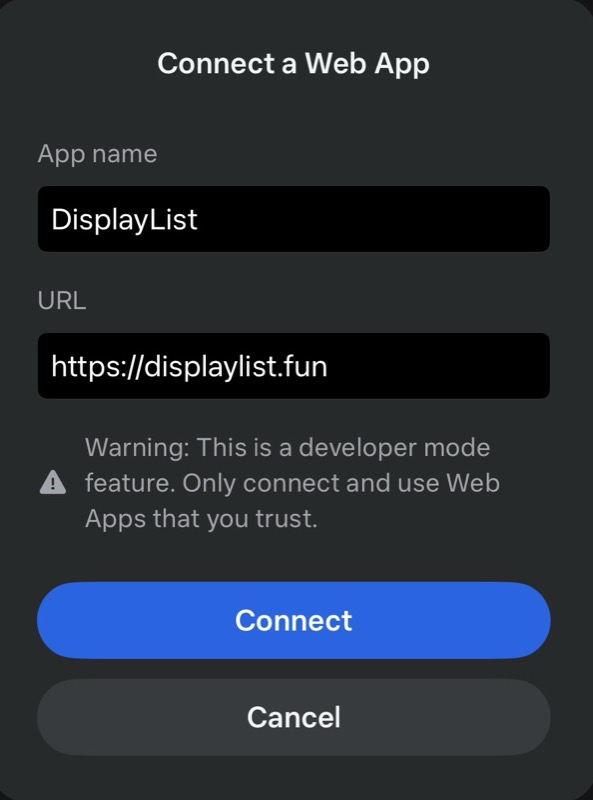
On your phone, tap the button below. It opens the Meta AI app with DisplayList filled in.
Install on glassesIf the button does not open the Meta AI app, add it by hand under Glasses settings, App connections, Web apps, Add a web app.
03
Pair your glasses
Open DisplayList in your glasses. A six-character code appears. Sign in at displaylist.fun on your phone or computer, open Pair glasses, and enter the code.
Pair glassesIf something does not work
- No Developer Mode pop-up? Update the Meta AI app and try the five taps again.
- The code on your glasses changed? Codes refresh every ten minutes. Enter the one you see now.
- Still stuck? Write to support@displaylist.fun and say what you see. A person answers.